Fallout 4

Fallout 4

91 ratings
Revert Anniversary Update back to 1.10.984 (EN)
By Fusion
Guide how to revert your Fallout 4 game back to version 1.10.984 (The last update prior to Anniversary)
This utilizes F4SE to prevent the game from updating back to Anniversary edition.

NOTE: This will prevent you from being able to use mods from the Creation kit.
6
6
3
5
2
2
2
   
Award
Favorite
Favorited
Unfavorite
Downloading 1.10.984 Manifests
We will need to access Steam's Console to access and download v1.10.984 files.

1) Open Run (Windows Key + R)

2) Type in steam://open/console

This will open another tab on steam next to your username called Console

3) Paste these into the console individually. You can download multiple at a time just make sure you enter them individually.

download_depot 377160 377162 5698952341602575696
download_depot 377160 377161 7332110922360867314
download_depot 377160 377163 8681102885670959037
download_depot 377160 393885 5000262035721758737
download_depot 377160 435871 7785009542965564688
download_depot 377160 435880 366079256218893805


You will get a message from the console stating that the download is completed. It will look like this:
Depot download complete : "C:\Program Files (x86)\Steam\steamapps\content\app_377160\depot_377161" (manifest 8482181819175811242)

Make sure that your downloads have completed before moving to the next step.


Update Fallout 4 game files to match 1.10.984
We will start transferring the manifests we have downloaded from the Steam console to the game directory.

It is optional to create a backup of your Fallout 4 game directory if you would like to. We will be overwriting files in this guide for the anniversary update so any changes made will need to be reverted via a local file verify.

In this example We'll use the following manifest, but the steps will be the same for the other manifests.
"C:\Program Files (x86)\Steam\steamapps\content\app_377160\depot_377161" (manifest 8482181819175811242) )

1) Copy the location of the manifest ex: C:\Program Files (x86)\Steam\steamapps\content\app_377160\depot_377161

2) Open Fallout 4's game file location (default is C:\Program Files (x86)\Steam\steamapps\common\Fallout 4) You can also access this via steam by right clicking on Fallout 4 > Manage > Browse Local Files

Note if you would like to create a backup of your fallout 4 game directory, copy the fallout 4 folder to another location

3) Copy and paste the files directly into the Fallout 4 folder. You will want to overwrite the existing files.
Do this for each manifest.

DO NOT LAUNCH THE GAME
Prevent the game from updating
We will want to adjust this to prevent all of our changes from being reverted.

1) Right click on fallout 4 in your steam library and select properties

2) Select the Updates tab

3) Set Automatic updates to Wait until I launch the Game

DO NOT LAUNCH THE GAME YET
Download F4SE and Vortex Mod Manager
To simplify things we'll be using Vortex Mod Manager to launch the game
Download for Vortex Mod Manager [www.nexusmods.com]

You'll have to do some basic setup to get Fallout 4 up and going on Vortex.

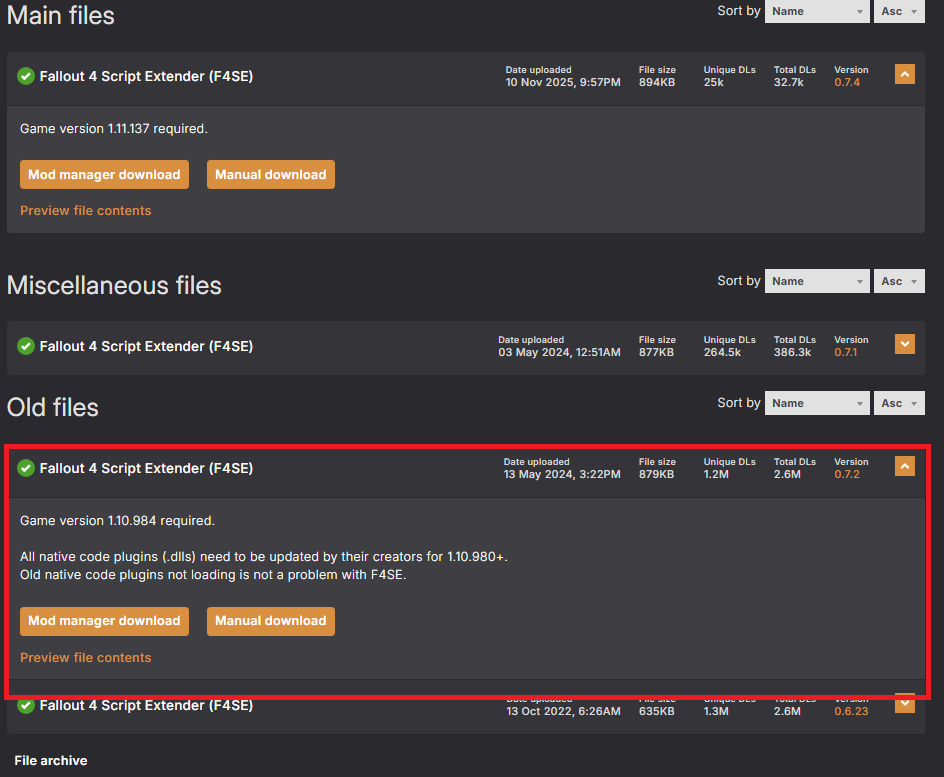
Once you have downloaded and installed Vortex, we'll download the F4SE Plugin. Make sure you use this link as it's the one directly for version 1.10.984.
Link for F4SE[www.nexusmods.com]


If the download doesn't start automatically, just select F4SE 0.7.2 under Old Files. To have it install automatically through Vortex, select Mod Manager Download

F4SE will download through Vortex and will create a separate launcher in your Fallout 4 game directory.
(Default C:\Program Files (x86)\Steam\steamapps\common\Fallout 4\F4se_loader.exe)
You can either create a shortcut to this and launch via that or you can set F4SE to load by default in Vortex.

To launch F4SE from Vortex:
1) Go to the Dashboard tab on the left side

2) On the tools tab in the middle click the 3 dots next to Fallout 4 Script Extender (If F4SE isn't visible select the + and click F4SE)

3) Select Run as Primary

When you launch via the top left on Vortex it will now launch via F4SE and prevent your game from updating.

Final Notes:

Make sure you're launching via Vortex or via the shortcut for the F4SE
Default C:\Program Files (x86)\Steam\steamapps\common\Fallout 4\F4se_loader.exe

47 Comments
AprendizZK 2 hours ago 
YOU GOD! you saved my game, i could not open it anymore no matter what, finaly i can spend 20h modding it to play for 2h and quit ;)
Dr. Kleiner 30 Nov @ 6:29am 
Alr thanks Zush :steamthumbsup:
SPACE MARINE 30 Nov @ 3:34am 
:BL3Thumbsup:
Than the is the ussie you are having I checked and that was the dlc part.
Dr. Kleiner 29 Nov @ 9:59am 
no
@Dr. Kleiner do you own Vault-Tec Workshop dlc?
Dr. Kleiner 29 Nov @ 8:23am 
Uh the download_depot 377160 393885 5000262035721758737 doesnt work as it says in the console that there is no subscription. Can someone help?
trollosapiens 26 Nov @ 10:04am 
Man, I do not want to sound like an optimist but it seems that your guide saved my game and my precious modlist. Thank you!
Bella Adler 26 Nov @ 2:23am 
Awarded a Jester :ChipJoy::lol:
Bella Adler 26 Nov @ 2:22am 
Thanks to your guide I managed to fix my game 🙏😳