Counter-Strike 2

Counter-Strike 2

Not enough ratings
Setting up SourceMod and MetaMod
By r1fl and 1 collaborators
In this guide we will learn how to install the sourcemod and the metamod - the familiar "!admin" panel and etc..
   
Award
Favorite
Favorited
Unfavorite
Sourcemod - Overview
SourceMod is server modification for any game that runs on the Half-Life 2 engine. It is a powerful, highly optimized platform for scripting plugins and handling server administration. The default package comes with a base set of plugins, but there are over 2,500 plugins in the community.


Basic Features (Users)
  • An easy to use, deeply fine-grained permissions system (SQL compatible)
  • A highly configurable admin menu
  • Reserved slots
  • Flexible map management plugins (nominations, rock the vote, etc)
  • Basic commands such as kicking/banning/slapping/muting players, changing cvars, etc
  • Various voting commands
  • Chat spam protection
  • Comprehensive chat triggers for both users and administrators
  • Easily translatable

More info can be found here[www.sourcemod.net].
Metamod - Overview
The Half-Life serverside engine could originally only support one mod at a time, because it used to load a DLL which contained the standard engine as well as the mod.

Metamod is a serverside mod that fixed this, allowing multiple mods to be run at once. Many such mods run under Metamod, referred to as Metamod plugins.

The AMX Mod was a plugin running under Metamod that allowed scripts to be written for the servers. It got its name from the filename extension of compiled Pawn files, which stands for Abstract Machine eXecutive. In 2007 the AMX Mod project was merged into the related AMX Mod X, which had more features.

But in 2010, AMX Mod was brought back to life by a few people of fans. Then, in 2013 May 1, the new AMX Mod Team officially re-opened the old site with a design remastered a bit (old-school style like!). AMX Mod is now always maintained and finally purpose more than a half thousand mile of custom plugins, modern then properly and highly updated for the last versions (features).
Install - SourceMod + MetaMod
Local server -

First, go to the original sourcemod web site download page. Select your server os and download the compressed file.

Download can be found in here -

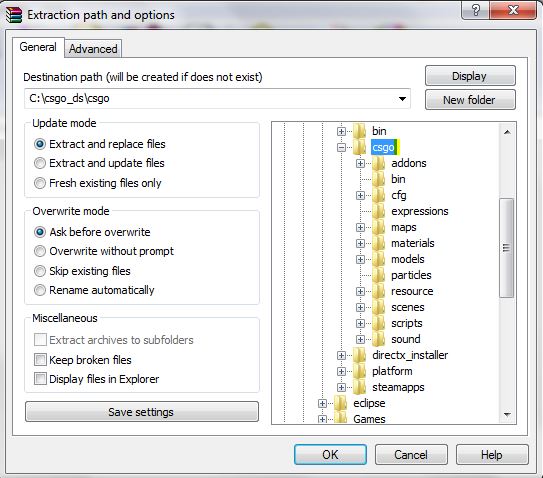
When you finished downloading the compressed file, extract the rar/tar.gz/zip into the game subfiles folder in your dedicated server dir.

Example:


Remote server -

If you aren't using local server, your server should suppurt ftp (File Transfer Protocol). By the deffenition, to create a protocol we need both of the devices to connunicate - Your server and the user pc. To create the protocol, assuming that the ftp software is already installed on your server. You need to download the client version.

Download can be found in here -

Top 5 by my opinion.


When you finish downloading. Connect to your server (Def port - 21) and upload the source mod and the meta mod according the local server instructions.
Checking the Install
Once SourceMod is uploaded/copied and configured with Metamod:Source, restart your server completely. If it is local, shut it down and restart it. If it is remote, you may need to ask your server provider for help. However, it is often safe to issue a "quit" command via rcon, since most providers will automatically restart your server.

First, in your server console (not client console), type:

meta list

If the install worked, you will see something like:

] meta list

Listing 1 plugin:
[01] SourceMod (1.1.0.2489) by AlliedModders LLC
Support
Donate \ Join the steam group to support

https://steamproxy.net/tradeoffer/new/?partner=177013858&token=s-qNwiQn

https://steamproxy.net/tradeoffer/new/?partner=204506329

Thanks, like and comment if the guide was helpful.

Add\Comment here if you need any help.

-Hibiki
-h0pe