Steam
376 평점
Steam Chat Logger
Aezillo 님과 2명의 기여자가 작성
A program that automatically saves your Steam conversations to your PC as organized text files.


어워드
즐겨찾기
즐겨찾기됨
즐겨찾기 해제
If you're looking for someone to animate your profile, contact snaws design service.
Feel free to check his Website![www.snaws.design]


Steam has an awful way of recording chat history, so this guide provides a program that automatically saves your Steam conversations to your PC as organized text files.


This program was created by Sp0okER. Check their stuff out below.

⠀⠀•⠀Their GitHub
⠀⠀•⠀Their Steam Profile


If at any point in this guide your anti virus software is triggered, it is a false positive. This program is completely safe and open source. You can see for yourself by visiting it's source code here.


Visit this page to download the program: https://github.com/sp0ok3r/ChatLogger/releases
Simply click the first zip file under the assets menu to start the download.


Go ahead and extract the zip file anywhere that you want to store the program.


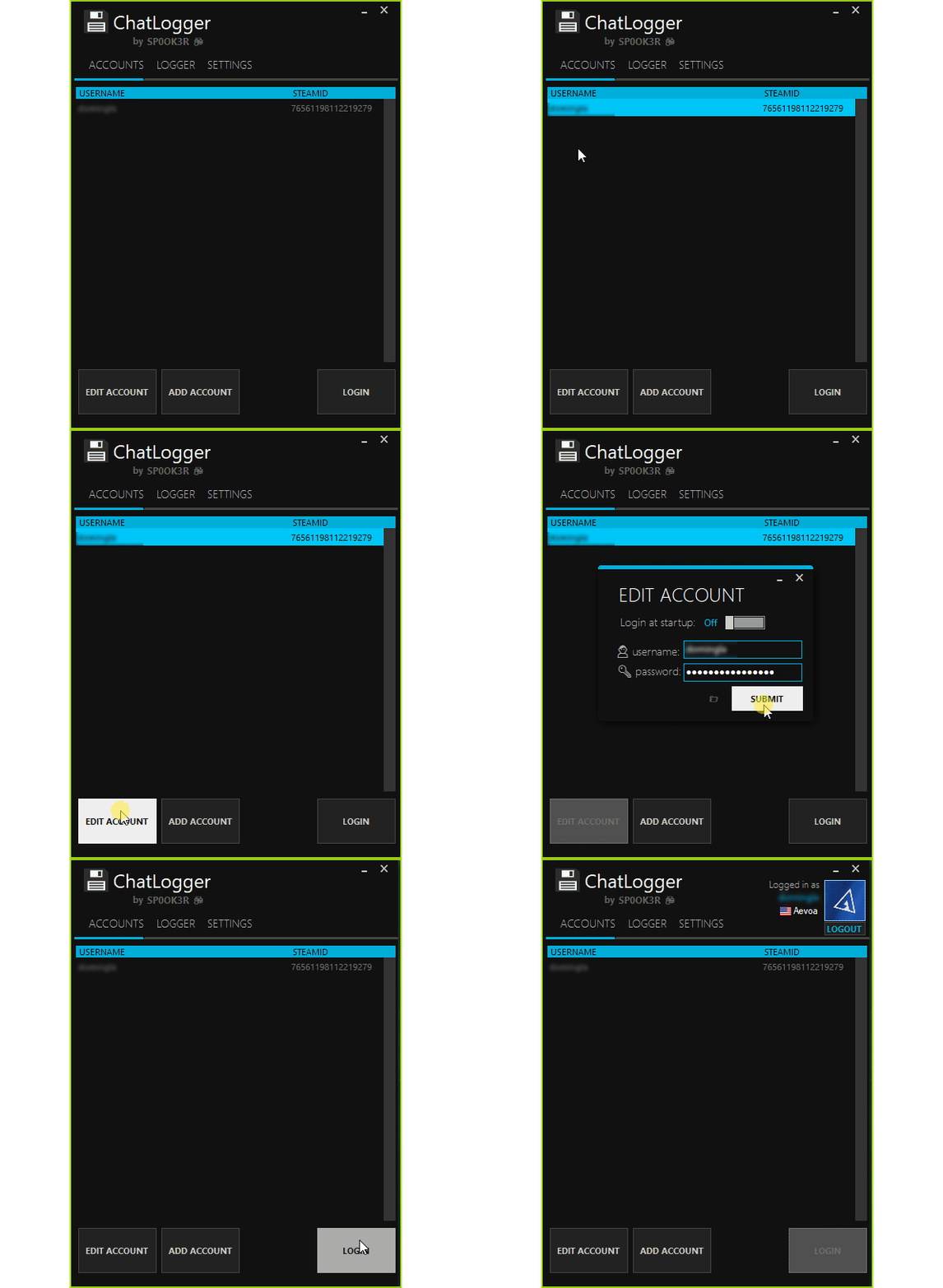
Open the folder and double click application to start it. It should auto detect your Steam account.


Select your account and click the edit account button. If your account isn't detected, click the add account button instead.


Log into your Steam account. This program is completely safe and you can view it's source code here.


If you have mobile authenticator you'll be prompted to enter the code before logging in. After successfully logging in it should show your avatar in the upper corner.


Once you're logged in, you can navigate to the logger tab to manage where your chat logs are saved.


By default, the logs are stored in the chat logs folder in the same folder that the application is in.


To keep this program always saving your chat history, here are some settings you should turn on:


The first is found during the login screen, and the second is under the settings tab.


I hope you enjoyed this guide. Feel free to leave a comment if you have any questions. Other guides:

⠀⠀•⠀Large collection of profile related guides.
⠀⠀•⠀Download older versions of Steam games.
⠀⠀•⠀How to identify Steam backgrounds.

Follow my Steam account to get updated when the newest guides release.
댓글 72
TortFeastor 2025년 7월 11일 오전 9시 57분 
What's with the Furry buttcheeks? lol time for a new logo
dariankingo 2025년 5월 6일 오후 1시 26분 
still working ?
TheKiller 2025년 4월 8일 오전 3시 45분 
Awesome app ! I missed this feature since Xfire closed in 2015.
It would be nice if it could load the whole existing chats saved in Steam.
kovha 2025년 3월 30일 오전 6시 06분 
So it seems like I did everything right but nothing's downloading at all. The Messages Log just displays the text 'Waiting for new messages...' and I've waited for an hour for this. Is there anything else I need to do? Or anybody who experienced the same issue before?
spO_okER;; 🌴  [작성자] 2024년 11월 10일 오후 1시 38분 
fixed, uploaded new version
nili3000042 2024년 8월 31일 오후 3시 13분 
repo down
Atom's Atrocious 2024년 8월 26일 오전 6시 51분 
Github Repo is now down. I guess it's safe to assume this program does not work anymore?
GRIKHORIOR in da GAMES 2024년 6월 5일 오후 4시 28분 
Tell me, please, what should I do if I downloaded it, launched it, added my account, but when I try to log in, nothing happens? It seems that there is even a connection to authentication on the mobile, but nothing happens there either.
bosadjo 2024년 5월 18일 오전 8시 32분 
It asks me for my Steam Guard code every time I open it and it doesn't save any chat log it's stuck at recording...
spO_okER;; 🌴  [작성자] 2023년 4월 20일 오전 4시 00분