Steam
125 人が評価
Get your artwork showcase to match your background!
作者: chunkyspacemonkey
This is the first of the many guides I'm planning on making. Have any suggestions for a guide? Leave a comment! This guide will teach you how to match your artwork/screenshot showcase with your background.
   
アワード
お気に入り
お気に入り
お気に入りから削除
Introduction
Okay, so this whole process is pretty simple. What's the point, you might ask; doing this makes your profile look a lot more pro ;). The traditional way use to be to download the background, take a screenshot of your profile, put it into paint.net, blah blah blah. This method is a lot easier and more time efficient.
First Step
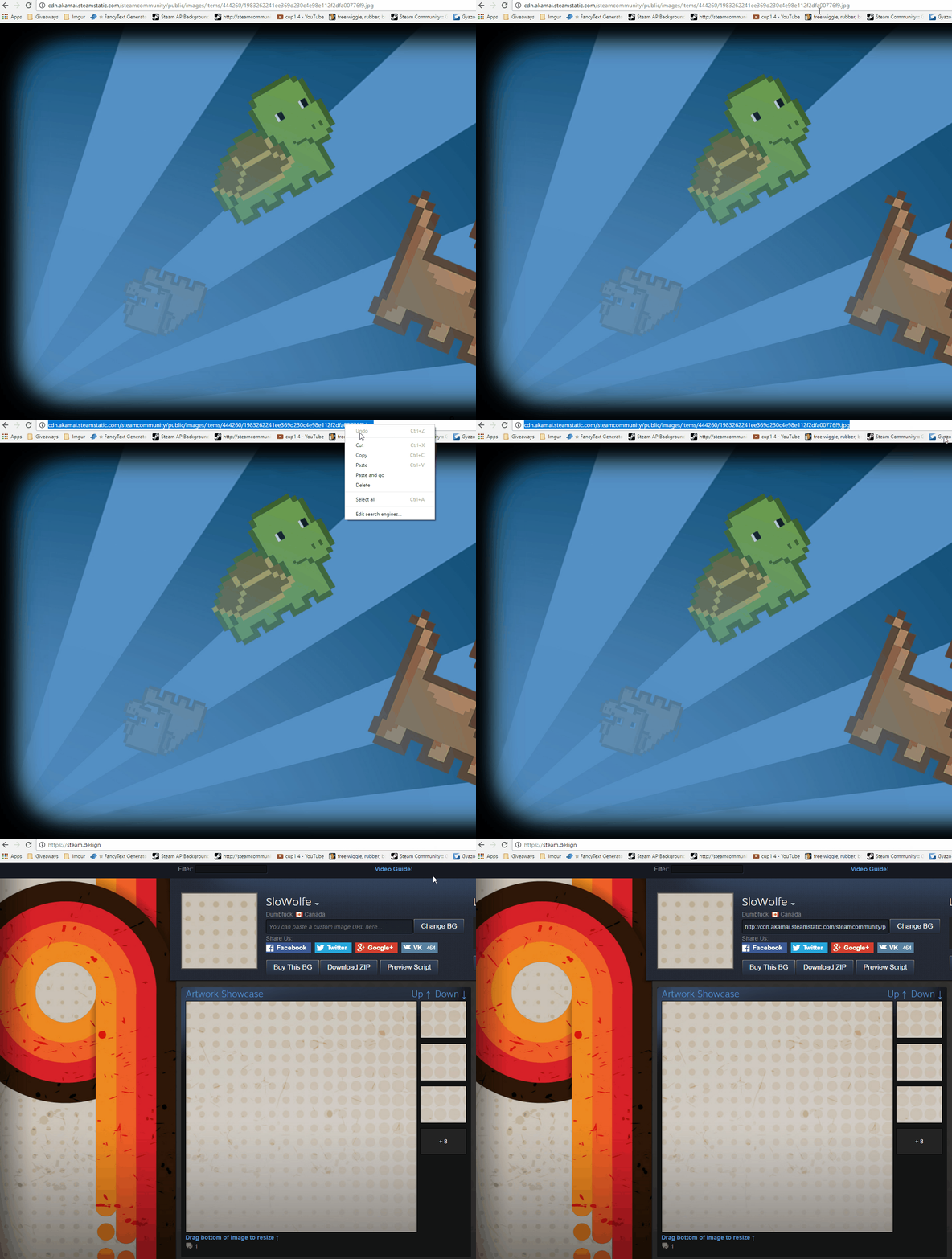
Alright, so, first off you want to go to this site[steam.design]. Find a background you like. If you're having trouble finding one, follow this guide. Once you've found your background, go to your Steam inventory, go to your background, click "View Full Size", and copy the URL into the website's "You can paste a custom image URL here" section.
Second Step
Okay, so after you've set your lengths and such for the pictures, click the "Download ZIP" button and drag the files out to your desktop. An easy way to upload images to Steam is this link. Put in a title, maybe a description, and tick "I certify that I created this artwork".
Final Step
Here's where things get a tad complicated. Once you've uploaded the pictures, go to your profile. Click "Edit Profile", scroll down to "Select a Showcase" and select Artwork Showcase. For the big picture, click on the biggest empty space and click on your picture. This applies for the rest of the pictures. Scroll all the way down and click "Save Changes"
Conclusion
Heyyy, you did it! So proud. [color=#32FFF6]Again, be sure to tell me what guides you might want to see from me next! I'll try my best :D[/color]


13 件のコメント
Chill_Ryell 2024年4月20日 10時36分 
Is there any way you're able to make the artwork animated like the background?
˚spooky˚ 2021年10月13日 10時05分 
i cant find "select a showcase"
1738 2020年4月16日 10時53分 
doesnt work in 2020
Mumenoon 2019年2月17日 1時12分 
nice1la
Tsunade 2018年12月2日 8時03分 
Please help me how can I upload this Artwork with the infinite height I tried every possible guide but it didn't make it big https://steamproxy.net/sharedfiles/filedetails/?id=1580737292&fileuploadsuccess=1 My original picture was this : width: 600px, height: 338px
iNova 2018年8月13日 16時57分 
Don't worry, I've fixed it since. I got it working now and it looks nice!
chunkyspacemonkey  [作成者] 2018年8月13日 13時38分 
@Spartan1 How can I help?
iNova 2018年8月11日 11時40分 
Too small, I'm confused. :(
TheoreticalJacob 2018年2月12日 8時33分 
Yea the cropped image is too narrow
𝓙𝓞𝓔 𝓙𝓔𝓣𝓣 2017年12月6日 10時03分 
Nice !